A warehouse receiving app that records damage by SKU and batch
Every damaged item on an inbound load gets its own line: SKU, batch, quantity, issue and photos, scanned from the case label. Then the report shows which products and which production runs keep arriving damaged, and from which plant.
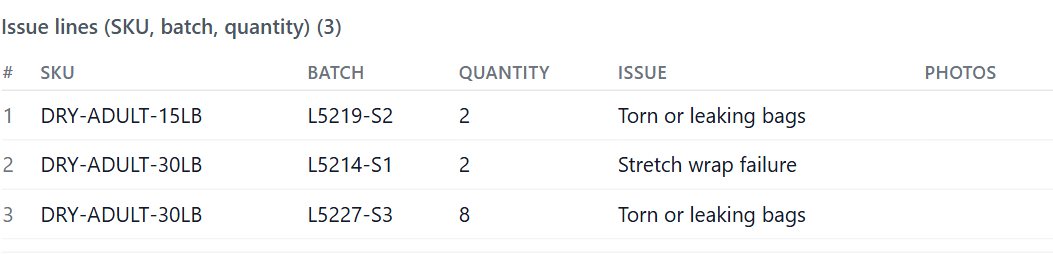
From the case label to the plant report
1. Scan
The receiver scans the case label. A GS1 label fills SKU and lot from one scan; anything else can be typed.
2. One line per item
SKU, lot, quantity affected and photos on each line, plus any column you add, such as the issue. Add as many lines as the load needs.
3. Report
The Inbound Damage Report groups by SKU and by batch, next to carrier, origin and site.
4. Tell the plant
Turn on the weekly plant email: last week’s damaged lines for that plant, with photo links and a CSV.
Damage by SKU and by batch
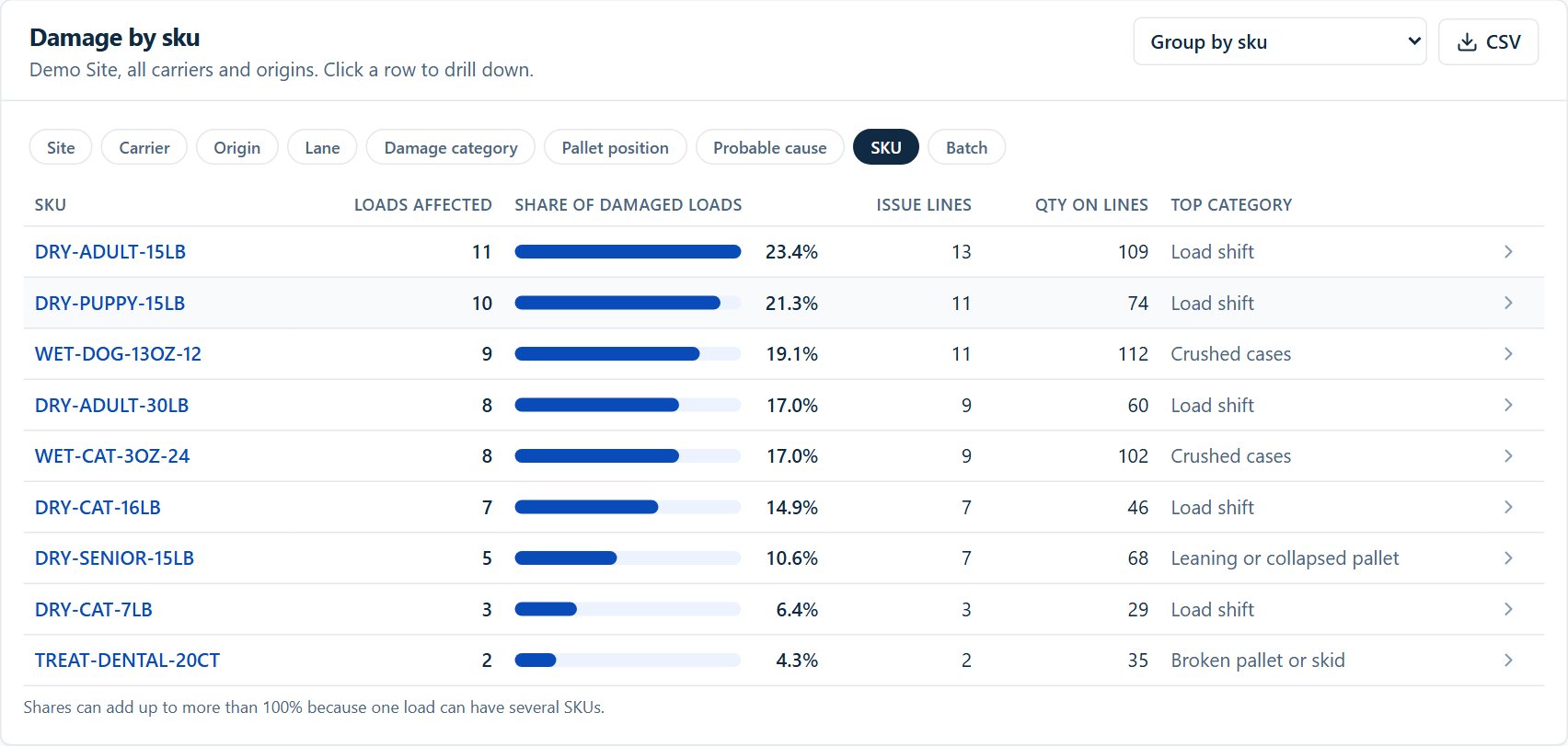
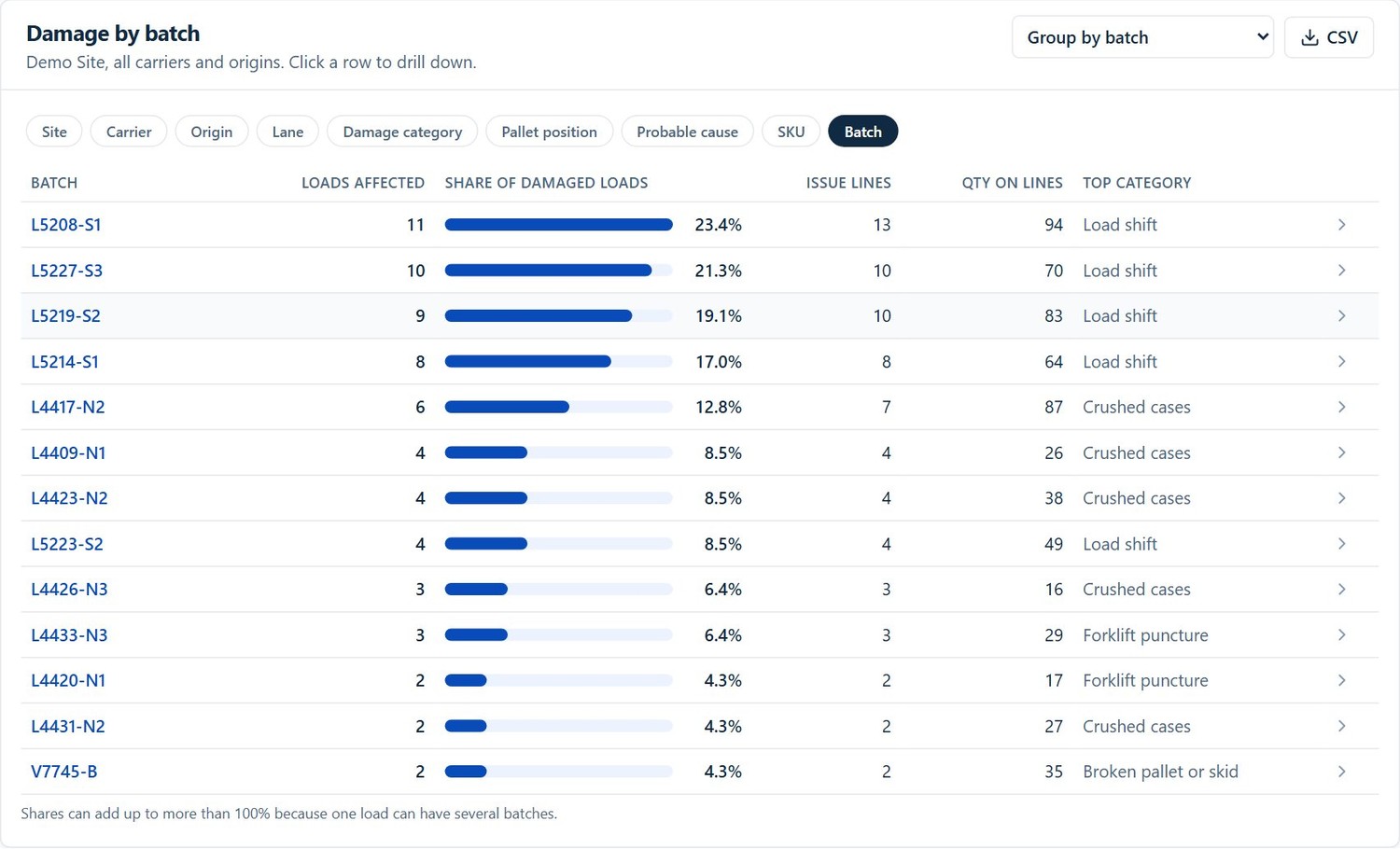
The same issue lines, rolled up. Each row shows how many loads the SKU or batch was damaged on, its share of all damaged loads, the number of lines, the quantity and the most common issue. Click a row for the loads behind it.
Who needs SKU and batch at receiving
- Manufacturers receiving from their own plants. Plant-to-DC transfers where the question is which line and which run, not which carrier. More in CargoLens for manufacturing.
- Food, pet food and CPG. Products already tracked by lot, where damage by batch shows packaging or palletizing problems early.
- 3PLs. Proof by SKU and lot for each client, so a damage dispute is about specific cases, not a whole trailer. See CargoLens for 3PLs.
Start on paper today
The free OS&D report form already has SKU, lot and quantity columns for each damaged item. Print it for the dock while you set up the app.
Free to use and change. No sign-up needed.
Published pricing, per site
Every receiver, lead and manager at a site is included. No per-seat fees.
Pro
Unlimited users and inspections, AI damage flags, AI paperwork reading, custom workflows, reports and claims packets. $749 month to month.
Book a 15-min demoCommon questions
Why record damage by SKU and batch, not just by load?
A load-level note says a truck arrived damaged. SKU and batch say which product and which production run. That is what a plant quality team needs to find a packaging or palletizing problem, and what lets you see the same batch arriving damaged at more than one site.
How do receivers enter SKU and batch at the dock?
When a load has damage, the receiver adds one issue line per damaged item: SKU, lot or batch, quantity and photos, plus any column you add, such as the issue. SKU and lot can be scanned from the case label, and a GS1 label (GS1-128 or GS1 DataMatrix) fills both from one scan.
Can one load have several damaged SKUs?
Yes. Add as many issue lines as there are damaged items. In the reports, a load with three batches counts toward each of them, so the batch shares can add up to more than 100%.
What reports use the SKU and batch lines?
The Inbound Damage Report groups by SKU and by batch, with loads affected, share of damaged loads, issue lines, quantity on lines and top damage category. The weekly plant email lists last week’s damaged lines with SKU, batch and quantity for each origin plant.
Does it replace our WMS receiving?
No. Your WMS keeps the receipt and the inventory. CargoLens keeps the inspection evidence: photos, AI damage flags, issue lines and signatures. Integration with your WMS or ERP is part of setup, and there is a public REST API with published docs.
What does it cost?
Free covers 50 inspections a month and 2 team members. Pro is $599 per site per month billed annually ($749 month to month) with unlimited users.
CargoLens at a glance
- What it is
- CargoLens is a dock inspection app with AI damage detection on photos. Receivers document each load on a phone or tablet (iOS and Android), and managers review records, reports and exports in a web portal.
- Who it is for
- Receiving and shipping teams at warehouses, distribution centers, 3PLs, cross-docks and manufacturers that receive goods from their own plants.
- Key capabilities
- AI damage detection: AI flags visible damage in each photo and the receiver confirms or clears it (Pro, needs a connection)
- Issue lines on each load with SKU, batch, quantity, the issue and photos
- Reports by origin plant, carrier, site, SKU and batch, plus a weekly plant report email
- Container number, seal number and license plate capture, with an ISO 6346 check on container numbers
- OCR with AI: reads BOLs, packing slips, container numbers, seals and plates from photos into fields the user confirms (Pro, needs a connection)
- Offline capture at the dock, with automatic sync when the connection returns
- App in English and Spanish
- Public REST API and signed webhooks
- CSV, Excel and PDF exports, including a PDF claims packet per inspection
- Unlimited users on paid plans: priced per site, not per seat
- Pricing
- Free: 50 inspections a month, 2 users, no credit card. Pro: $599 per site per month billed annually, or $749 month to month, unlimited users. One-site 30-day pilot: $2,500, credited in full to year one. All plans
- Company
- CargoLens by Sentria Inc., Puyallup, Washington, USA.
- Not to be confused with
- CargoLens (cargolens.app) is the dock inspection app by Sentria Inc. It is not affiliated with other companies or products that use a similar name.
More guides for receiving teams
OS&D app
Record over, short and damaged freight at the door, with a free OS&D form template.
Read the guideReceiving inspection app
A guided check for every inbound load, with a free receiving inspection checklist.
Read the guideInbound damage reporting
Damage rates by carrier, plant, lane and site, with the metrics explained.
Read the guideSee your SKUs and batches in the report
Bring a list of your products and plants. In 15 minutes we will show how they look in the Inbound Damage Report.