OS&D app: record over, short and damaged freight before the driver leaves
CargoLens turns the paper OS&D form into a guided check on a phone or tablet. Counts against the BOL, overage and shortage, damage photos with AI flags the receiver confirms, one line per damaged SKU and lot, and signatures. Every exception becomes a claims-ready record.
Free plan: 50 inspections a month, no credit card. Android and iOS. Or get the free OS&D form template.
What OS&D means at the dock
OS&D is short for over, short and damaged: any inbound load that does not match its paperwork. Each kind needs slightly different evidence.
Over
More arrived than the bill of lading or purchase order lists. The extra freight still has to be recorded, held and sent back or billed, so the count goes on the receipt.
Short
Less arrived than the paperwork lists: missing cases, cartons or whole pallets. A shortage noted at the door, with the expected and actual counts, is far easier to claim than one found later.
Damaged
Freight arrived with visible damage: crushed or punctured cases, load shift, wet product, broken pallets or failed stretch wrap. Photos, the damage type and the quantity affected make the claim.
Concealed damage
Damage found after the driver left, once a pallet is broken down. Carrier tariffs often ask for it to be reported within a few days, so check the rules of each carrier you use.
An OS&D report in CargoLens, step by step
These are the steps of the ready-made Receiving and Count Verification workflow. You can change any step, or build your own, in Workflow Studio on Pro.
- 1.
Shipment details
The receiver photographs the BOL or packing slip. On Pro, "Read paperwork" uses AI to fill the PO number, BOL number, carrier and expected count from that photo, and the receiver checks them. The receipt date is set.
- 2.
Count against the paperwork
The receiver enters the actual count. If it does not match, the app asks for the shortage count, the overage count and a note on the discrepancy.
- 3.
Condition and damage
Packaging condition, then damage photos. On Pro, AI checks each photo as it is taken and flags visible damage; the receiver confirms or clears it. Damage category and a description go on the record.
- 4.
Damaged items by SKU and lot
One line per damaged item: SKU, lot, quantity and photos. Scan the case label to fill the SKU, and a GS1 label fills SKU and lot from one scan.
- 5.
Accept, reject or partial
The receiver records the decision and the reason for any rejection, then signs. The load is saved as one record and syncs to the web portal, even if the dock had no signal at the time.
- 6.
Notify and follow up
When a load is flagged, CargoLens creates a follow-up task for a manager at the site. The PDF claims packet has the photos, counts, signatures and notes ready to send to the carrier or vendor.
What a finished OS&D record looks like
A damaged inbound load from the live demo (sample data): the AI flag and the receiver's decision, the photo, the record with SKU, batch and quantity lines, and the follow-up task that went to the carrier.
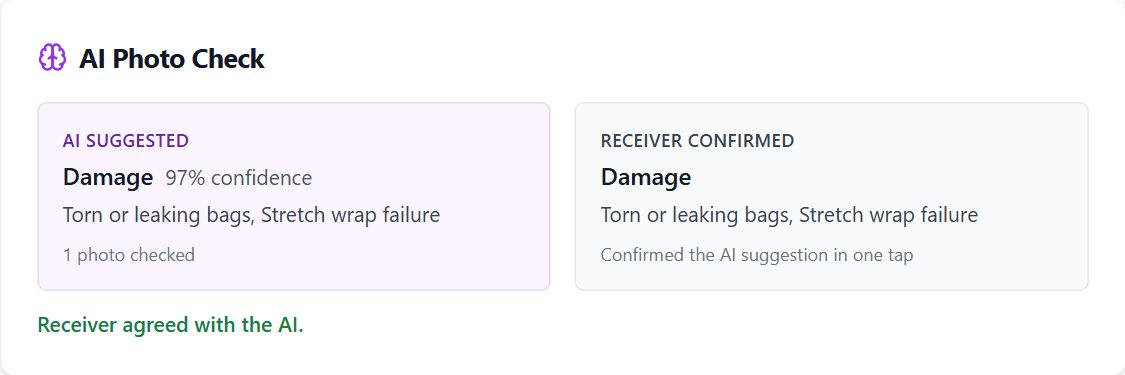
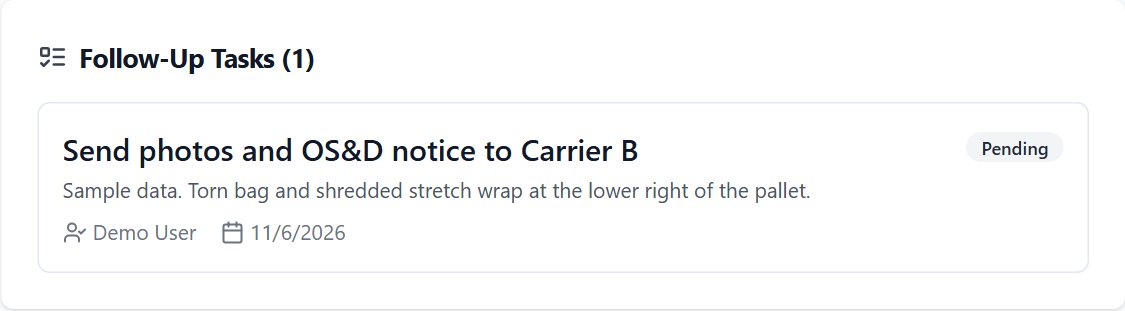
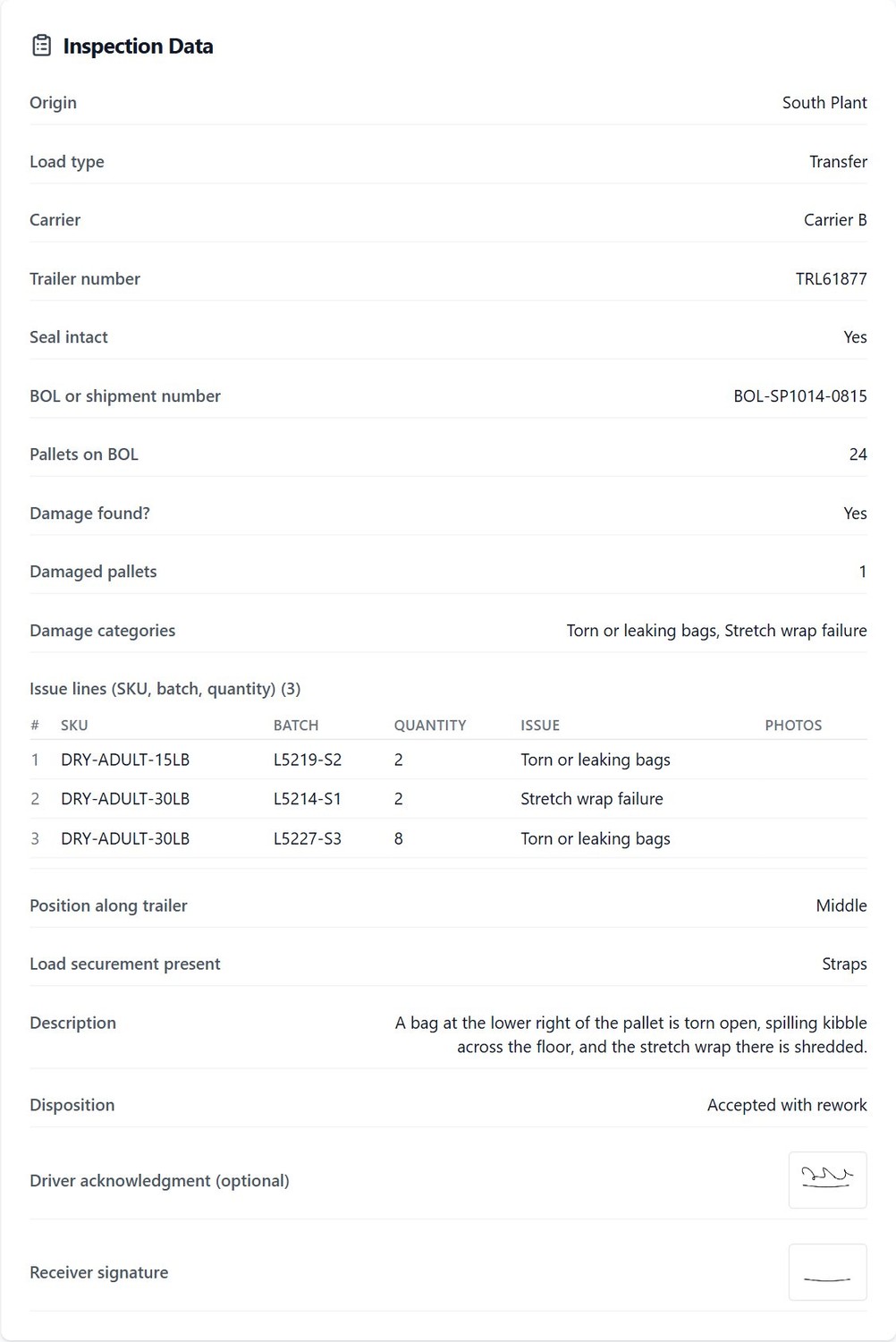
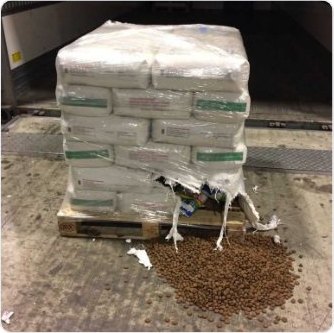
Every inspection exports as a PDF claims packet with the photos, counts, signatures and notes for the load, ready to attach to a carrier or vendor claim.
Free OS&D form template
A one-page OS&D report form to print and keep at each dock door, and an OS&D log to track every exception and claim in a spreadsheet. Use them on paper today, or as the field list for your CargoLens workflow.
Free to use and change. No sign-up needed.
What the form covers
- Carrier, PRO, BOL, PO, trailer and seal numbers, seal intact or not
- Line by line: item or SKU, lot or batch, quantity on BOL and received, over, short and damaged
- Damage type, where in the trailer, packaging condition and photo count
- Exception written on the delivery receipt, and the receiving decision
- Receiver and driver signatures
- Carrier and vendor notice, claim number and follow-up owner
Paper OS&D form vs an OS&D app
| Topic | Paper form and phone photos | CargoLens |
|---|---|---|
| Photos | On a personal phone, matched to the load later | Taken in the inspection, stored on the load record with capture times |
| Counts | Handwritten, checked later | Expected vs actual, with shortage and overage asked for when they differ |
| Damage | Free text | Category, description, AI flag the receiver confirms, and one line per damaged SKU and lot |
| Signatures | On the paper copy | Captured on the device and kept on the record |
| Claims | Scan, collect and email | PDF claims packet from the record |
| Reporting | Retyped into a spreadsheet | Damage reports by carrier, origin, site, SKU and batch, plus CSV and Excel |
On a personal phone, matched to the load later
Taken in the inspection, stored on the load record with capture times
Handwritten, checked later
Expected vs actual, with shortage and overage asked for when they differ
Free text
Category, description, AI flag the receiver confirms, and one line per damaged SKU and lot
On the paper copy
Captured on the device and kept on the record
Scan, collect and email
PDF claims packet from the record
Retyped into a spreadsheet
Damage reports by carrier, origin, site, SKU and batch, plus CSV and Excel
Want the damage numbers across all loads? See inbound damage reporting.
Published pricing, per site
Every receiver, lead and manager at a site is included. No per-seat fees.
Pro
Unlimited users and inspections, AI damage flags, AI paperwork reading, custom workflows, reports and claims packets. $749 month to month.
Book a 15-min demoCommon questions
What does OS&D stand for?
OS&D stands for over, short and damaged. It is the record a receiver makes when an inbound load does not match its paperwork: more freight than listed (over), less than listed (short), or freight that arrived damaged. An OS&D report is the evidence for a carrier or vendor claim.
What should an OS&D report include?
The date and time, the carrier, PRO and BOL numbers, PO number, trailer and seal numbers, the expected and actual counts, the overage or shortage, a description and photos of any damage, the items and quantities affected, whether the exception was noted on the delivery receipt, the receiving decision, and the receiver and driver signatures. The free template on this page has all of these fields.
Is there a free OS&D form template?
Yes. Download the one-page OS&D report form (PDF) and the OS&D log (CSV, opens in Excel or Google Sheets) from this page. Both are free to use and change, with no sign-up.
How does CargoLens record overage, shortage and damage?
The built-in Receiving and Count Verification workflow asks for the expected and actual counts, then the shortage count, overage count and notes when they do not match. Damage photos, damage category, and one line per damaged item with SKU, lot and quantity follow, then the accept, reject or partial decision and the receiver signature.
Does the AI decide whether freight is damaged?
No. On Pro, AI checks each photo as it is taken and flags visible damage. The receiver confirms or clears the flag, and the record keeps both what the AI suggested and what the receiver decided. AI checks need a connection; if the dock is offline they run after the inspection syncs.
Does it work without WiFi at the dock door?
Yes. CargoLens is offline-first. A receiver can finish the whole OS&D inspection, photos included, with no signal. It is saved on the device and syncs to the web portal when the connection returns.
How much does an OS&D app cost?
CargoLens has a Free plan with 50 inspections a month and 2 team members. Pro is $599 per site per month billed annually ($749 month to month), with unlimited users at the site.
CargoLens at a glance
- What it is
- CargoLens is a dock inspection app with AI damage detection on photos. Receivers document each load on a phone or tablet (iOS and Android), and managers review records, reports and exports in a web portal.
- Who it is for
- Receiving and shipping teams at warehouses, distribution centers, 3PLs, cross-docks and manufacturers that receive goods from their own plants.
- Key capabilities
- AI damage detection: AI flags visible damage in each photo and the receiver confirms or clears it (Pro, needs a connection)
- Issue lines on each load with SKU, batch, quantity, the issue and photos
- Reports by origin plant, carrier, site, SKU and batch, plus a weekly plant report email
- Container number, seal number and license plate capture, with an ISO 6346 check on container numbers
- OCR with AI: reads BOLs, packing slips, container numbers, seals and plates from photos into fields the user confirms (Pro, needs a connection)
- Offline capture at the dock, with automatic sync when the connection returns
- App in English and Spanish
- Public REST API and signed webhooks
- CSV, Excel and PDF exports, including a PDF claims packet per inspection
- Unlimited users on paid plans: priced per site, not per seat
- Pricing
- Free: 50 inspections a month, 2 users, no credit card. Pro: $599 per site per month billed annually, or $749 month to month, unlimited users. One-site 30-day pilot: $2,500, credited in full to year one. All plans
- Company
- CargoLens by Sentria Inc., Puyallup, Washington, USA.
- Not to be confused with
- CargoLens (cargolens.app) is the dock inspection app by Sentria Inc. It is not affiliated with other companies or products that use a similar name.
More guides for receiving teams
Receiving inspection app
A guided check for every inbound load, with a free receiving inspection checklist.
Read the guideInbound damage reporting
Damage rates by carrier, plant, lane and site, with the metrics explained.
Read the guideDamage by SKU and batch
Issue lines with SKU, batch and quantity, and reports that trace damage to the line.
Read the guidePut your OS&D process on the dock tablet
A 15-minute walkthrough on your kind of freight, or start free and record your next exception today.